Record once.
Get both.
TutorialScribe turns a single screen recording into a polished written tutorial and a video — at the same time. Real human narration as the source of truth. Works with any app on your desktop.
Every other tool makes you choose.
Scribe does text. Guidde does video. Nobody bridges them with real human narration as the source of truth — until now.
Scribe Text + screenshots, no narration | Guidde Video-first, synthetic voice | TutorialScribe Written + video, real narration | |
|---|---|---|---|
| Written tutorial output | — | ||
| Video output | — | ||
| Real human narration | — | — | |
| Works outside the browser | Limited | — | |
| Local-first, privacy by design | — | — |
Record dumb. Process smart.
The recording layer captures everything without processing. The AI layer only runs when you explicitly ask — after you've reviewed every captured event.
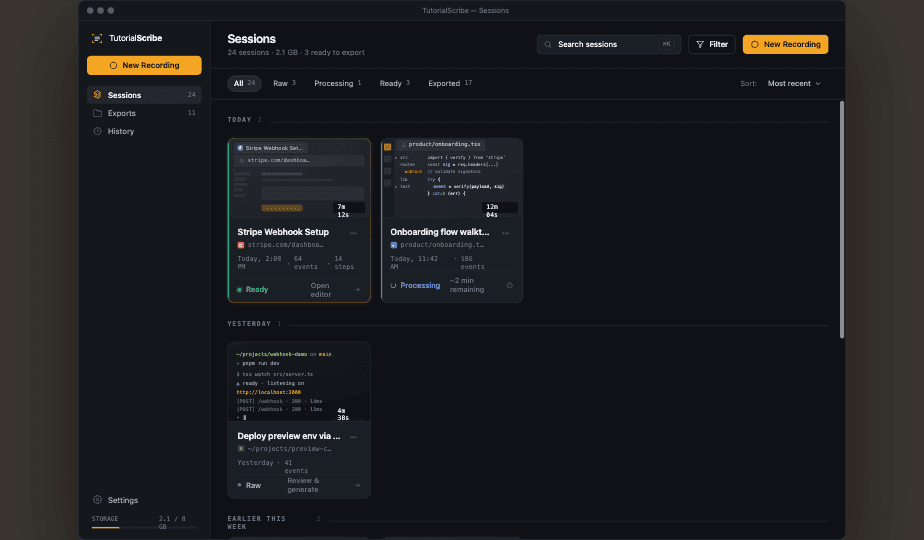
Hit ⌘⇧R and go. TutorialScribe captures every click, keystroke, and text entry across any desktop app — alongside a continuous screen recording and your spoken narration. Nothing is processed during capture.
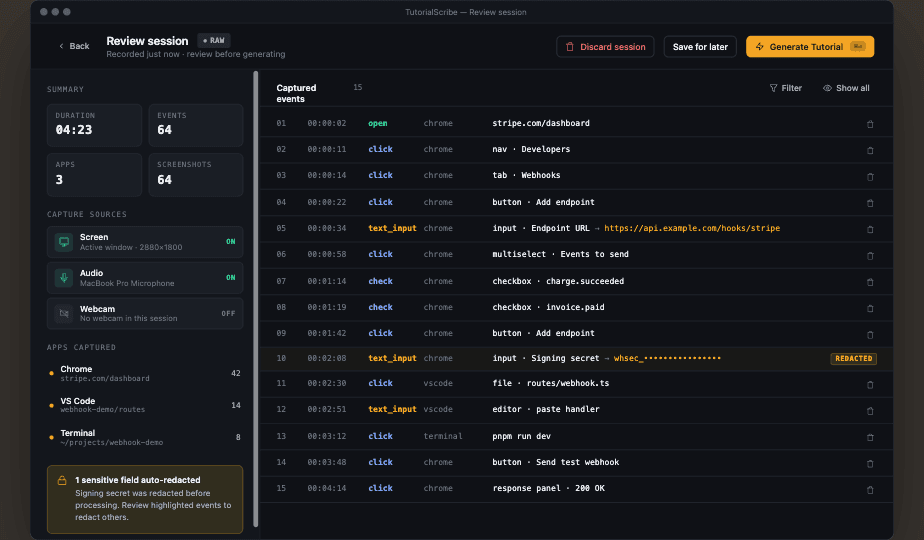
Before anything goes to AI, review every event in order. Redact sensitive fields. Delete noise. Then click Generate Tutorial — Claude uses your narration as the structural backbone, not guesswork from clicks alone.
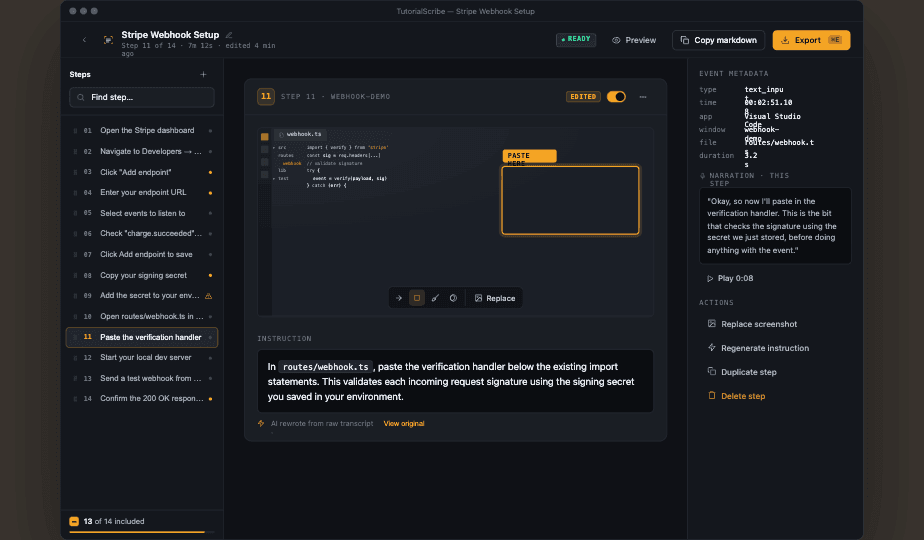
Edit AI-generated step instructions inline. Reorder or merge steps. Swap any screenshot from the full session archive. Export as clean Markdown, self-contained HTML — plus your screen recording.
Built for the desktop. Not the browser.
A thick client that works wherever you work — IDEs, terminals, thick clients, any app on your machine.
You narrate as you work. Whisper transcribes every word with per-word timestamps. Claude rewrites your spoken narration into precise, imperative step instructions. Not synthetic. Not guessed from clicks.
Global input capture works across Chrome, VS Code, terminals, thick clients, and everything else. If it runs on your desktop, TutorialScribe can record it. No browser extension required.
A structured written tutorial — Markdown or self-contained HTML with embedded screenshots — and a full screen recording. Neither format is compromised. No re-recording to fix a screenshot.
Nothing leaves your machine during capture. Whisper can run fully local. The only cloud call is the Claude API — and only when you click Generate Tutorial. No ambient processing, no telemetry.
Local-first
by design.
Built for teams recording sensitive internal workflows. The privacy model is not a checkbox — it's the architecture.
Recording stays on your machine. Captures, audio, video, and event data are written to local storage and never leave the device during recording.
Whisper can run fully local. Choose the local WASM backend and transcription never touches a cloud API. No audio leaves your machine.
One explicit cloud call. The only required network request is the Claude API — and only when you click Generate Tutorial. You review every captured event first and can redact sensitive fields before anything is sent.
No telemetry. No usage tracking. TutorialScribe collects nothing about how you use it. No analytics, no crash reporting, no phoning home.
Ready to stop choosing?
TutorialScribe is in active use by the Automation Anywhere Developer Relations team. Request early access and help shape what it becomes.
Request early accessmacOS · Apple Silicon · Private beta